


ZEBRONICS
ZEBRONICS NC6500D Laptop Cooling Pad with Support up to 17 inch (43.18 cm) Laptops, Hexa Fans, Speed Control, RGB LED, Detachable Mobile Holder, 5 Step Retractable Stand, Built in USB Ports (Black)
ZEBRONICS NC6500D Laptop Cooling Pad with Support up to 17 inch (43.18 cm) Laptops, Hexa Fans, Speed Control, RGB LED, Detachable Mobile Holder, 5 Step Retractable Stand, Built in USB Ports (Black)
In stock
Couldn't load pickup availability
Shipping & Delivery
Shipping & Delivery
- Order Processing & Shipping: 24–48 hours.
- Delivery Time: 1–7 business days (depending on location)
Return, Replacement & Warranty
Return, Replacement & Warranty
Every Product Is Backed By 1 To 2 Year Warranty
Contact
Contact
📧 Email — support@wekartonline.com
📦 Orders — orders@wekartonline.com
🛡️ Warranty — warranty@wekartonline.com


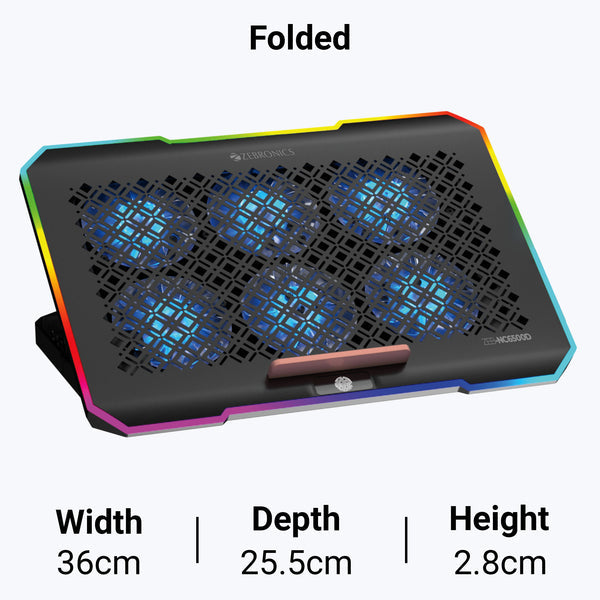
ZEBRONICS NC6500D Laptop Cooling Pad with Support up to 17 inch (43.18 cm) Laptops, Hexa Fans, Speed Control, RGB LED, Detachable Mobile Holder, 5 Step Retractable Stand, Built in USB Ports (Black)
ZEBRONICS ZEB-NC6500D Laptop Cooling Pad for 17 Inch Laptops
Premium hexa-fan cooling solution with RGB lighting, adjustable ergonomic stand, and mobile holder for laptops up to 17 inches
Quick Answer
The ZEBRONICS ZEB-NC6500D is a premium USB-powered laptop cooling pad featuring six 70mm cooling fans, adjustable fan speed control, RGB lighting, a detachable mobile holder, dual USB connectivity, and a 5-step ergonomic stand for laptops up to 17 inches.
The ZEB-NC6500D laptop cooling pad from ZEBRONICS is designed for users who spend long hours working, gaming, attending online classes, or running demanding applications. Its six-fan cooling system delivers 47 CFM airflow with adjustable speed control, while the 5-step retractable stand improves viewing comfort and posture.
Specifications at a Glance
| Specification | Details |
|---|---|
| Brand | ZEBRONICS |
| Model | ZEB-NC6500D |
| Fan Count | 6 x 70mm Fans |
| Fan Speed | 2200–2400 RPM (Adjustable) |
| Airflow | 47 CFM |
| Supported Laptop Size | Up to 17 inch |
| RGB Lighting | Yes (Tap Control) |
| Ergonomic Stand | 5-Step Retractable |
| Mobile Holder | Detachable |
| Power Source | USB Powered |
| Weight | 910g |
| Warranty | 1 Year Carry-In Warranty |
Key Features
Hexa Fan Cooling System
Six 70mm high-speed fans deliver 47 CFM airflow with adjustable speed control between 2200-2400 RPM, ensuring optimal thermal performance for demanding tasks.
Supports Up to 17 Inch Laptops
Wide platform accommodates all laptop sizes from 11 to 17 inches, making it compatible with gaming laptops, business notebooks, and ultrabooks.
RGB LED Lighting with Tap Control
Built-in RGB LED lighting adds a premium aesthetic to your workspace, controlled with a simple tap for easy on/off switching.
5-Step Ergonomic Stand
Retractable 5-level height adjustment lets you customize viewing angle and typing position, reducing neck and back strain during extended usage.
Detachable Mobile Holder
Integrated mobile phone holder keeps your smartphone within easy reach for multitasking, video calls, or reference material during work sessions.
USB Powered with Dual Ports
Powered directly from your laptop's USB port with no external adapter needed. Includes pass-through USB port to maintain connectivity for other devices.
Complete Product Description
The ZEBRONICS ZEB-NC6500D laptop cooling pad is engineered for professionals, students, gamers, and content creators who rely on their laptops for extended periods. Overheating is a common issue that reduces performance, causes thermal throttling, and can shorten the lifespan of internal components. This cooling pad addresses these concerns with a powerful six-fan cooling system, ergonomic design features, and USB-powered convenience.
Why Laptop Cooling Matters in India
Indian climates, especially during summer months, push ambient temperatures above 35°C in many regions. When combined with intensive tasks like video editing, 3D rendering, software development, or gaming, laptop temperatures can exceed 85-90°C, triggering thermal throttling that reduces CPU and GPU performance by 20-30%. Dust accumulation in laptop vents further restricts airflow, compounding the problem.
The ZEB-NC6500D creates a cushion of cool air beneath your laptop, improving ventilation and drawing heat away from the chassis. Users report temperature reductions of 8-15°C during typical workloads, with even greater improvements during intensive gaming or rendering sessions. This translates to sustained performance, quieter internal fans, and improved component longevity.
Six-Fan Cooling Architecture
The hexa-fan design uses six independent 70mm fans arranged across the cooling pad's surface. This distributed layout ensures even airflow coverage regardless of where your laptop's intake vents are located. Each fan operates at 2200-2400 RPM, collectively generating 47 CFM (Cubic Feet per Minute) of airflow.
The adjustable fan speed control allows you to balance cooling performance with noise levels. During light tasks like document editing or web browsing, you can run the fans at lower speeds for quieter operation. For demanding applications like AutoCAD, Photoshop, gaming, or video rendering, you can increase fan speed to maximum for aggressive cooling.
Unlike single or dual-fan cooling pads that create localized cooling zones, the six-fan configuration provides comprehensive thermal management across the entire laptop base. This is particularly beneficial for gaming laptops and mobile workstations where heat-generating components (CPU, GPU, RAM, storage) are distributed across the motherboard.
Ergonomic Benefits Beyond Cooling
The 5-step retractable stand transforms your laptop into an ergonomic workstation. You can adjust the angle from flat to approximately 30 degrees, elevating the screen closer to eye level. This reduces neck strain during long work sessions and promotes better posture.
Elevating the laptop also improves typing comfort by angling the keyboard into a more natural position for your wrists. Students attending online classes, office workers in video conferences, and programmers writing code for hours will notice reduced fatigue and discomfort compared to using a laptop flat on a desk.
The anti-slip baffle design prevents your laptop from sliding off the elevated surface, even when typing vigorously or adjusting the screen angle. The cooling pad's 910g weight provides stability without making it too heavy to carry in a laptop bag when traveling.
RGB Lighting for Modern Setups
The built-in RGB LED lighting system adds visual appeal to your workspace or gaming setup. The lighting is controlled via a simple tap switch, allowing you to turn it on when you want the aesthetic effect and off when you prefer a minimalist look or want to conserve USB power.
For content creators streaming on YouTube or Twitch, the RGB lighting provides subtle background illumination that enhances production value during desk setup shots. For gamers, it complements RGB keyboards, mice, and monitors to create a cohesive gaming environment.
The lighting does not significantly impact power consumption and is designed to work reliably from USB power without requiring separate electrical connections.
Mobile Holder Convenience
The detachable mobile holder is a practical addition for multitasking scenarios. You can position your smartphone within easy view while working on your laptop, making it convenient to monitor notifications, follow tutorial videos, attend WhatsApp video calls, or reference notes from your phone screen.
For students, this allows simultaneously viewing online class recordings on the phone while taking notes on the laptop. For business users, it enables monitoring communication apps while working on documents or presentations. The holder detaches when not needed, maintaining the cooling pad's sleek profile.
Who Should Buy the ZEB-NC6500D?
This cooling pad is ideal for several user categories in the Indian market:
- Students and Online Learners: Those attending Zoom classes, Google Meet sessions, or online coaching for 4-6 hours daily will benefit from reduced laptop temperatures and improved viewing angles.
- Software Developers and Programmers: Running IDEs like Visual Studio Code, Android Studio, or IntelliJ IDEA alongside browsers and testing environments generates significant heat. The cooling pad maintains performance during compilation and debugging.
- Gamers: Playing demanding titles like GTA V, Valorant, Call of Duty Mobile (on emulators), or AAA games causes laptops to run hot. The cooling pad prevents thermal throttling that would otherwise reduce frame rates.
- Content Creators and Video Editors: Rendering videos in Adobe Premiere Pro, DaVinci Resolve, or Final Cut Pro pushes CPUs and GPUs to their limits. Proper cooling ensures faster render times and prevents crashes.
- Office Professionals: Using Microsoft Office, Tally ERP, SAP, or running virtual machines generates heat during multi-tasking. The cooling pad ensures comfortable typing and reduces fan noise during video conferences.
- Graphic Designers: Working in CorelDRAW, Adobe Illustrator, or Photoshop with multiple layers and high-resolution files demands consistent performance that benefits from active cooling.
Comparison with Alternative Cooling Solutions
| Feature | ZEB-NC6500D (6 Fans) | Typical 2-Fan Cooling Pads |
|---|---|---|
| Airflow Coverage | Full laptop base (47 CFM) | Localized zones only |
| Temperature Reduction | 10-15°C typical | 5-8°C typical |
| Fan Speed Control | Adjustable (2200-2400 RPM) | Fixed speed (most models) |
| RGB Lighting | Yes (Tap Control) | Rare or fixed color |
| Ergonomic Stand | 5-step adjustable | 2-3 steps (most models) |
| Mobile Holder | Detachable included | Not included |
| Max Laptop Size | 17 inch | 15.6 inch (most models) |
| Noise Level | Low at adjustable speeds | Higher at fixed speeds |
USB Power Efficiency
The ZEB-NC6500D draws power directly from your laptop's USB port, eliminating the need for separate power adapters or wall sockets. This makes it highly portable and convenient for use in cafes, libraries, co-working spaces, or while traveling.
The cooling pad includes a pass-through USB port, so you don't lose a USB connection by plugging in the cooling pad. You can still connect your mouse, keyboard, external drive, or other peripherals without needing a separate USB hub.
Power consumption is optimized to work reliably with standard USB 2.0 and 3.0 ports. The fans are designed to operate efficiently within USB power limits while still delivering strong airflow performance.
Build Quality and Durability
ZEBRONICS uses durable ABS plastic construction that balances strength with lightweight portability. The fan grills are designed with a mesh pattern that maximizes airflow while preventing dust accumulation on fan blades.
The retractable stand mechanism uses reinforced hinges that can withstand daily adjustment without loosening over time. The anti-slip rubber pads on the bottom keep the cooling pad stable on desks, even on smooth glass or laminate surfaces.
At 910g, the cooling pad is light enough to carry in a laptop bag without adding significant weight, yet heavy enough to provide stability when the laptop is positioned on top. The slim profile (approximately 30mm at the thickest point when stand is retracted) makes it easy to store in backpacks or laptop sleeves.
Installation and Setup
Using the ZEB-NC6500D requires no technical expertise. Simply place the cooling pad on your desk, position your laptop on top, and connect the USB cable to any available USB port on your laptop. The fans will start immediately, and you can adjust fan speed using the built-in control switch.
The RGB lighting is controlled separately via a tap switch, allowing you to customize the visual effect according to your preference or environment. The mobile holder clips onto the designated slot on the side of the cooling pad and can be removed when not needed.
The 5-step stand is adjusted by pulling or pushing the retractable legs at the back of the cooling pad. Each step locks into place securely, and you can switch between angles in seconds depending on your comfort needs.
Compatibility Across Laptop Brands
The ZEB-NC6500D works with all laptop brands commonly sold in India, including:
- Dell (Inspiron, Vostro, XPS, Latitude, Alienware)
- HP (Pavilion, Envy, Omen, EliteBook, ProBook)
- Lenovo (IdeaPad, ThinkPad, Legion, Yoga)
- Asus (VivoBook, ZenBook, ROG, TUF Gaming)
- Acer (Aspire, Swift, Predator, Nitro)
- MSI (GF, GL, GS, Creator series)
- Apple MacBook (Pro and Air models up to 16 inch)
- Samsung, LG, Microsoft Surface Laptop
The cooling pad supports screen sizes from 11 to 17 inches, accommodating ultrabooks, standard business laptops, and large gaming laptops with equal effectiveness.
Real-World Performance Scenarios
Scenario 1: Online Classes and Video Conferencing
Students attending 4-6 hour Zoom or Google Meet sessions often experience laptop overheating, especially when the webcam and microphone are active continuously. The ZEB-NC6500D keeps temperatures under control, prevents the laptop's internal fans from becoming distractingly loud during calls, and the ergonomic stand improves camera angle for better video framing.
Scenario 2: Gaming Sessions
Playing games like PUBG PC, Fortnite, Valorant, or Apex Legends can push laptop GPUs to 80-90°C. With the cooling pad, temperatures drop to 70-75°C range, preventing thermal throttling that would reduce frame rates. The RGB lighting adds to the gaming ambiance, and the elevated stand improves screen viewing angle during gameplay.
Scenario 3: Software Development
Running Docker containers, virtual machines, or compiling large codebases in Android Studio generates sustained heat. The cooling pad ensures consistent CPU performance during builds, reducing compilation times and preventing slowdowns during multi-tasking between IDE, browser, and emulator.
Scenario 4: Video Editing and Rendering
Exporting 4K videos in Adobe Premiere Pro or rendering 3D animations in Blender can take 30 minutes to several hours. The cooling pad prevents thermal throttling during these intensive tasks, ensuring full CPU/GPU utilization and faster completion times. Editors also benefit from the ergonomic stand during long editing sessions.
Scenario 5: Accounting and ERP Software
Running Tally ERP 9, SAP, or Busy accounting software with large databases can cause laptops to heat up during report generation and data processing. The cooling pad maintains comfortable typing temperatures and reduces fan noise during client meetings or office work.
Why Buy from WeKart Online Store?
WeKart Online Store is a trusted name in computer hardware and electronics retail across India. When you purchase the ZEBRONICS ZEB-NC6500D from WeKart Online Store, you receive:
- 100% Genuine Products: All items sold by WeKart Online Store are sourced directly from authorized distributors, ensuring authenticity and full manufacturer warranty coverage.
- Proper GST Invoice: Every purchase includes a valid GST invoice for warranty claims, business expense documentation, and GST input credit.
- Quality Inspection: WeKart Online Store conducts quality checks before dispatch to ensure products reach customers in perfect condition.
- 7 Day Replacement Policy: If you receive a defective or damaged product, WeKart Online Store offers hassle-free replacement within 7 days of delivery.
- Fast Delivery: Orders are processed promptly with reliable courier partners, ensuring your cooling pad reaches you quickly.
- Cash on Delivery Available: For customers who prefer to pay upon receiving the product, WeKart Online Store offers COD across serviceable pin codes.
- Expert Customer Support: WeKart Online Store's support team can assist with product selection, compatibility questions, and post-purchase assistance.
Maintenance and Care Tips
To ensure long-lasting performance from your ZEB-NC6500D cooling pad:
- Clean the fan grills monthly using compressed air or a soft brush to remove dust buildup that can reduce airflow.
- Avoid placing the cooling pad on soft surfaces like beds or couches where fabric can block ventilation holes underneath.
- When transporting, ensure the USB cable is properly wrapped to prevent wire damage.
- If fan noise increases over time, it may indicate dust accumulation—clean immediately to restore quiet operation.
- Adjust fan speed according to workload—running at maximum speed unnecessarily may reduce fan motor lifespan.
Value Proposition in the Indian Market
The ZEBRONICS ZEB-NC6500D is competitively priced in the budget-to-mid range cooling pad segment. While premium imported cooling pads with similar features can cost 50-80% more, the ZEB-NC6500D delivers comparable cooling performance and build quality at a price point accessible to students, home users, and small businesses.
For users who have previously experienced laptop overheating issues, the cost of a cooling pad is minor compared to potential repair expenses from heat-damaged components. Replacing a failed motherboard, GPU, or hard drive due to prolonged heat exposure can cost thousands of rupees, making a cooling pad a smart preventive investment.
The 1 Year Carry-In Warranty from ZEBRONICS provides peace of mind, and WeKart Online Store's support ensures that any warranty claims are processed smoothly through authorized service centers.
💡 Pro Tip: For maximum cooling efficiency, ensure your laptop's own air intake vents align with the cooling pad's fans. Most laptops have intake vents on the bottom—the ZEB-NC6500D's six-fan layout ensures coverage regardless of vent placement.
Environmental and Practical Considerations
Using a cooling pad can actually reduce your laptop's overall power consumption. When internal temperatures are kept low, the laptop's built-in fans don't need to run at maximum speed, which consumes less battery power. This is particularly beneficial for users working unplugged or in areas with frequent power cuts.
The cooling pad's USB power draw is minimal (typically under 5W total for all six fans), so it won't significantly drain your laptop battery or increase electricity costs. Over time, the energy saved by preventing your laptop's fans from running at high speeds may actually offset the cooling pad's power usage.
From a sustainability perspective, extending your laptop's lifespan by preventing heat damage reduces electronic waste and delays the need for replacement, which has a positive environmental impact.
Compatibility Table
| Laptop Screen Size | Compatibility |
|---|---|
| 11 inch | ✅ Fully Compatible |
| 13 inch | ✅ Fully Compatible |
| 14 inch | ✅ Fully Compatible |
| 15.6 inch | ✅ Fully Compatible (Most Common) |
| 16 inch | ✅ Fully Compatible |
| 17 inch | ✅ Fully Compatible (Maximum Supported) |
| Compatible Laptop Brands | Works With |
|---|---|
| Dell | Inspiron, Vostro, XPS, Latitude, Alienware, G-Series |
| HP | Pavilion, Envy, Omen, EliteBook, ProBook, Victus |
| Lenovo | IdeaPad, ThinkPad, Legion, Yoga, ThinkBook |
| Asus | VivoBook, ZenBook, ROG, TUF Gaming, ExpertBook |
| Acer | Aspire, Swift, Predator, Nitro, Spin |
| MSI | GF, GL, GS, Creator, Modern, Prestige |
| Apple | MacBook Air (all sizes), MacBook Pro (up to 16 inch) |
| Samsung / LG / Microsoft | Galaxy Book, LG Gram, Surface Laptop |
Warranty Information
This ZEBRONICS ZEB-NC6500D Laptop Cooling Pad comes with 1 Year Carry-In Warranty from ZEBRONICS. Warranty service is provided through authorized ZEBRONICS service centers across India. Warranty covers manufacturing defects in fans, lighting, USB connectivity, and structural components. WeKart Online Store provides genuine products with valid warranty and full GST invoice for hassle-free warranty claims. For warranty claims, contact ZEBRONICS support or visit the nearest authorized service center with your purchase invoice.
Features and Specifications
Cooling Performance
- Six 70mm high-speed fans with optimized blade design
- 47 CFM total airflow for comprehensive cooling coverage
- Adjustable fan speed: 2200-2400 RPM for noise and performance balance
- Distributed fan layout ensures even airflow across entire laptop base
- Metal mesh grills for maximum air intake efficiency
- Typical temperature reduction: 10-15°C under load
Design and Build
- ABS plastic construction for durability and lightweight portability
- Weight: 910g (light enough for travel, stable enough for desktop use)
- Anti-slip baffle prevents laptop from sliding when elevated
- Anti-slip rubber pads on bottom for desk stability
- Slim profile for easy storage in laptop bags
- Professional black finish suitable for office and gaming environments
Ergonomic Features
- 5-step retractable stand with approximately 30-degree maximum angle
- Reinforced hinge mechanism for long-term durability
- Elevates screen to reduce neck strain during extended use
- Improves keyboard typing angle for wrist comfort
- Each height level locks securely in place
RGB Lighting System
- Built-in RGB LED lighting for aesthetic appeal
- Tap control switch for easy on/off operation
- Low power consumption, USB powered
- Complements RGB gaming setups or modern workspaces
- Does not interfere with cooling performance
Connectivity and Extras
- USB 2.0/3.0 powered (no external adapter needed)
- Pass-through USB port maintains connectivity for other devices
- Detachable mobile holder for smartphone positioning
- Built-in fan speed control dial or switch
- Compatible with Windows, macOS, Linux laptops
Technical Specifications Summary
- Model: ZEB-NC6500D
- Fan Configuration: 6 x 70mm fans
- Fan Speed: 2200-2400 RPM (adjustable)
- Airflow: 47 CFM total
- Supported Laptop Size: 11 to 17 inch
- Weight: 910 grams
- Power: USB powered (5V DC from laptop USB port)
- Material: ABS plastic with metal fan grills
- Color: Black
Item Details
Package Contents
- 1 x ZEBRONICS ZEB-NC6500D Laptop Cooling Pad
- 1 x USB power cable (approximately 50-60cm length)
- 1 x Detachable mobile holder
- 1 x User manual and warranty card
- Retail packaging for safe transport
Product Dimensions
- Platform Size: Accommodates laptops up to 17 inch screen size
- Thickness: Approximately 30mm when stand is retracted (slim profile)
- Weight: 910 grams (portable and lightweight)
- Suitable for desk use and travel in laptop bags
Brand Information
ZEBRONICS is one of India's leading brands in computer peripherals, gaming accessories, audio products, and laptop accessories. Established in 1997, ZEBRONICS has built a reputation for delivering quality products at competitive prices, serving millions of customers across India. The brand's extensive service network ensures reliable after-sales support and warranty service.
The ZEB-NC6500D is part of ZEBRONICS' premium cooling pad lineup, designed to meet the needs of modern laptop users who demand performance, comfort, and style. ZEBRONICS products are widely available through authorized retailers and online platforms across India.
Quality Assurance
- All products sold by WeKart Online Store are 100% genuine and sourced from authorized distributors
- Each unit undergoes quality inspection before dispatch
- Secure packaging prevents damage during shipping
- Valid GST invoice included with every purchase for warranty claims
- 7-day replacement policy for defective or damaged products
Additional Details
Ideal Use Cases
- Students: Perfect for attending online classes, watching lectures, and studying for long hours without discomfort
- Gamers: Prevents thermal throttling during intense gaming sessions, maintaining high frame rates
- Software Developers: Keeps temperatures low during compilation, IDE usage, and running multiple virtual environments
- Video Editors: Ensures consistent performance during rendering and exporting in Adobe Premiere, DaVinci Resolve, Final Cut Pro
- Graphic Designers: Maintains stable temperatures when working in Photoshop, Illustrator, CorelDRAW with large files
- Office Professionals: Comfortable for all-day productivity in Excel, Tally, SAP, video conferencing
- Content Creators: Supports streaming, video recording, and multi-tasking without overheating
Performance Benefits
- Reduces laptop temperatures by 10-15°C during normal to heavy workloads
- Prevents CPU and GPU thermal throttling that reduces performance
- Extends laptop component lifespan by reducing heat stress on motherboard, processor, storage
- Quieter operation as laptop's internal fans don't need to spin at maximum speed
- Improves battery life during unplugged use by reducing internal fan power consumption
- Maintains consistent performance during sustained workloads (compiling, rendering, gaming)
Comfort and Health Benefits
- 5-step ergonomic stand reduces neck and shoulder strain during prolonged use
- Elevates screen to eye level, promoting better posture
- Angled keyboard position improves wrist comfort and reduces carpal tunnel risk
- Cooler laptop base prevents uncomfortable heat on legs during lap use
- Improved airflow prevents sweaty palms and discomfort during typing
Portability and Convenience
- At 910g, light enough to carry in laptop bags for mobile professionals
- No external power adapter required—USB powered from laptop
- Works anywhere your laptop works: home, office, cafe, library, co-working spaces
- Pass-through USB port prevents loss of connectivity
- Detachable mobile holder can be removed for more compact travel packing
Value Comparison
Compared to basic 2-fan cooling pads in the market, the ZEB-NC6500D offers significantly better cooling coverage, adjustable fan speed control, RGB lighting, and a more robust ergonomic stand. Compared to premium imported cooling pads that cost 50-80% more, the ZEB-NC6500D delivers comparable performance and features at a much more accessible price point for Indian buyers.
When you factor in the potential cost of repairing heat-damaged laptop components (which can run into thousands of rupees for motherboard or GPU replacement), investing in a quality cooling pad is a smart preventive measure that pays for itself many times over in component longevity and sustained performance.
How to Install and Use
Initial Setup
- Remove the cooling pad from its packaging and inspect for any shipping damage
- Place the cooling pad on a flat, stable desk or table surface
- If you want to use the mobile holder, attach it to the designated slot on the side of the cooling pad
- Connect the USB power cable to the cooling pad's USB input port
- Carefully position your laptop on the cooling pad platform, ensuring it sits securely against the anti-slip baffle
Powering On
- Connect the cooling pad's USB cable to any available USB port on your laptop (USB 2.0 or 3.0)
- The fans will start running immediately once connected (some models may have a separate power switch)
- You should feel airflow from the fans and may hear a gentle humming sound
- If your cooling pad has RGB lighting, use the tap control to turn it on or off according to your preference
Adjusting Fan Speed
- Locate the fan speed control switch or dial on the cooling pad (usually on the side or front edge)
- For light tasks (web browsing, document editing), set fan speed to low or medium for quieter operation
- For intensive tasks (gaming, video rendering, compiling code), set fan speed to high for maximum cooling
- Adjust speed based on your comfort level between performance and noise
Adjusting Ergonomic Stand
- Locate the retractable stand legs at the back of the cooling pad
- Gently pull the stand legs outward to extend them
- The stand has 5 locking positions—continue extending until it clicks into your desired height
- Test stability by gently pressing on the cooling pad to ensure the stand is securely locked
- To lower, press the release mechanism (if present) and push the stand back to a lower position or fully retracted
- Choose an angle that brings your screen to eye level and creates a comfortable typing angle
Using the Mobile Holder
- If not already attached, insert the mobile holder into its designated slot on the cooling pad
- Position your smartphone in the holder, adjusting the grip or angle as needed
- The holder keeps your phone within easy reach for notifications, video calls, or reference material
- When not needed, simply remove the holder to maintain a cleaner workspace
Optimizing Airflow Placement
- Position your laptop so its air intake vents (usually on the bottom) align with the cooling pad fans
- Most laptops have intake vents along the bottom edges or center—the six-fan layout ensures coverage regardless of exact vent location
- Ensure the laptop sits flat and stable on the cooling pad surface
- Leave some clearance between the laptop's exhaust vents (usually on sides or back) and any walls or objects to allow hot air to escape freely
When to Use the Cooling Pad
- Always use during: Gaming, video editing, 3D rendering, software compilation, virtual machine usage, long video calls
- Recommended for: Extended work sessions (3+ hours), online classes, office productivity, content creation
- Optional for: Light web browsing, email checking (but still beneficial for ergonomic positioning)
- Critical during summer months: When ambient temperatures are high, cooling pads become essential to prevent overheating
Usage Guide
Best Practices for Maximum Cooling
- Place the cooling pad on a hard, flat surface—avoid using on beds, sofas, or laps where bottom vents can be blocked
- Ensure adequate clearance around the cooling pad for air circulation (at least 10-15cm from walls)
- Keep the cooling pad's fan grills clean—dust buildup reduces airflow efficiency
- Use higher fan speeds when performing intensive tasks, lower speeds for quiet tasks
- Consider also cleaning your laptop's internal fans periodically for best results
Temperature Monitoring Tips
- Use software like HWMonitor, Core Temp, or MSI Afterburner to track CPU and GPU temperatures
- Normal idle temperatures should be 35-50°C; with cooling pad, you may see 30-45°C
- Under load, temperatures above 85°C indicate thermal throttling risk—cooling pad should bring this to 70-80°C range
- Compare temperatures before and after using the cooling pad to measure effectiveness
Ergonomic Setup Recommendations
- Adjust the stand height so the top of your laptop screen is at or slightly below eye level
- Your elbows should be at approximately 90-degree angle when typing
- Consider using an external keyboard and mouse for even better ergonomics when the laptop is elevated
- Take breaks every hour—even with perfect ergonomics, prolonged sitting requires periodic movement
- Position the cooling pad directly in front of you, centered with your seating position
Power Management
- The cooling pad draws power from your laptop's USB port—typically under 5W total for all six fans
- This minimal power consumption does not significantly impact laptop battery life
- You can disconnect the cooling pad when not needed to conserve USB port for other devices
- Use the pass-through USB port to connect your mouse, keyboard, or other peripherals without losing connectivity
Maintaining Quiet Operation
- Clean fan grills regularly to prevent dust-induced noise
- Use lower fan speeds during quiet tasks like video calls or office work
- Higher speeds are necessary during gaming or intensive tasks but are generally not distracting in those scenarios
- If fans become louder over time, it may indicate bearing wear—contact ZEBRONICS support if under warranty
Travel and Portability Tips
- Retract the stand fully before packing to minimize thickness
- Wrap the USB cable neatly to prevent tangling or wire damage
- Remove the mobile holder if not needed to save space
- Place the cooling pad in a laptop bag sleeve for protection during transport
- The cooling pad works anywhere your laptop works—cafes, libraries, co-working spaces, hotel rooms
Safety Tips
Electrical Safety
- Use only the provided USB cable with the cooling pad
- Do not attempt to modify the USB cable or connect to non-USB power sources
- Ensure the USB connection is secure and not loose to prevent power fluctuations
- If the USB cable becomes damaged or frayed, stop using immediately and contact ZEBRONICS support
- Do not expose the cooling pad to water or liquids—if accidental spillage occurs, disconnect power immediately and allow to dry completely
Placement Safety
- Always use the cooling pad on a stable, flat surface to prevent tipping
- Ensure the stand is fully locked before placing your laptop on it
- Do not place near heat sources (radiators, direct sunlight, heaters)
- Keep away from edges of desks where it could be knocked off
- Ensure adequate ventilation around the cooling pad—do not cover with papers, cloth, or other objects
Maintenance Safety
- Disconnect the USB power before cleaning the cooling pad
- Use only dry cloths or compressed air for cleaning—do not use liquid cleaners directly on the unit
- Do not attempt to disassemble the cooling pad—this will void the warranty
- If fans stop working or make unusual noises, discontinue use and contact ZEBRONICS support
- Clean fan grills gently to avoid damaging the mesh or fan blades
Laptop Protection
- Ensure your laptop sits securely on the cooling pad and cannot slide off
- Do not exceed the maximum 17-inch laptop size recommendation
- Avoid placing excessively heavy laptops or objects on the cooling pad beyond its design capacity
- When adjusting the stand angle, support your laptop with one hand to prevent sliding
Environmental Considerations
- Operating temperature: 0°C to 40°C (normal room temperature range)
- Storage temperature: -10°C to 50°C (when not in use)
- Avoid using in extremely humid environments or near water sources
- Do not expose to direct rain or moisture
Child Safety
- Keep the cooling pad and its cables out of reach of young children
- The fan grills have small openings—do not allow children to insert fingers or objects into the fans
- The detachable mobile holder contains small parts that could be a choking hazard if disassembled
Warranty Cautions
- Do not remove warranty seals or attempt to open the cooling pad housing
- Unauthorized repairs or modifications will void the warranty
- Use only authorized ZEBRONICS service centers for repairs
- Keep your purchase invoice and warranty card in a safe place for warranty claims
Buying Guide
How to Choose the Right Laptop Cooling Pad
When shopping for a laptop cooling pad in India, consider these key factors to ensure you get the best value and performance for your specific needs:
1. Number of Fans
- 1-2 Fans: Basic cooling for light usage, suitable for ultrabooks and basic laptops
- 3-4 Fans: Good for standard laptops with moderate workloads
- 5-6 Fans (like ZEB-NC6500D): Best for gaming laptops, workstations, and intensive computing tasks
- More fans generally mean better cooling coverage and airflow distribution
2. Fan Speed Control
- Fixed Speed: Fans run at constant speed—simpler but less flexible
- Adjustable Speed (like ZEB-NC6500D): Better balance between cooling performance and noise—recommended for most users
- Adjustable speed allows you to run fans quietly during office work and at full power during gaming
3. Size Compatibility
- Match the cooling pad size to your laptop screen size
- ZEB-NC6500D supports up to 17 inch, making it suitable for almost all laptops
- Using a cooling pad smaller than your laptop reduces cooling effectiveness
- A larger cooling pad works fine for smaller laptops
4. Ergonomic Features
- No Stand: Flat design only, no viewing angle adjustment
- 2-3 Position Stand: Basic height adjustment
- 5+ Position Stand (like ZEB-NC6500D): Better customization for different users and tasks—highly recommended for long work sessions
- Ergonomic stands reduce neck and back strain significantly
5. Power Source
- USB Powered (like ZEB-NC6500D): Most convenient, no need for wall sockets, highly portable
- AC Powered: Requires wall socket, less portable but can power more fans or larger fans
- For mobile professionals and students, USB powered is almost always the better choice
6. Additional Features to Consider
- RGB Lighting: Aesthetic appeal for gaming setups (available on ZEB-NC6500D)
- Mobile Holder: Convenient for multitasking (included with ZEB-NC6500D)
- Pass-Through USB Port: Maintains USB connectivity for other devices (included with ZEB-NC6500D)
- Anti-Slip Design: Prevents laptop from sliding when elevated
- Build Quality: Durable ABS plastic preferred over flimsy materials
7. Budget Considerations
Laptop cooling pads in India typically range from:
- ₹300-600: Basic 1-2 fan models, fixed speed, minimal features
- ₹700-1500: Mid-range 3-4 fan models, some adjustability
- ₹1500-3000: Premium 5-6 fan models with ergonomic stands, RGB, extras (ZEB-NC6500D falls here)
- ₹3000+: High-end imported models or specialized gaming cooling solutions
The ZEB-NC6500D offers excellent value in the mid-to-premium segment with features typically found in more expensive models.
Who Should Buy the ZEB-NC6500D?
- Gamers who play demanding titles and want to prevent thermal throttling
- Software developers running resource-intensive development environments
- Video editors and content creators working with large media files
- Students attending long online classes who need ergonomic support
- Office professionals working 6-8 hours daily on laptops
- Anyone with a laptop that runs hot or suffers from thermal throttling
- Users who value ergonomic workspace setup to reduce physical strain
Why Buy from WeKart Online Store?
- Genuine Products: 100% authentic ZEBRONICS products with full manufacturer warranty
- GST Invoice: Proper documentation for warranty claims and business expenses
- Quality Check: Every product inspected before dispatch by WeKart Online Store team
- Fast Delivery: Quick processing and reliable courier partners across India
- 7-Day Replacement: Hassle-free replacement if you receive defective or damaged product
- COD Available: Cash on Delivery option for your convenience
- Expert Support: Knowledgeable customer service team to assist with product selection and queries
- Trusted Reputation: WeKart Online Store is a established name in computer hardware retail
Common Buyer Questions
Q: Will this cool my specific laptop model?
A: Yes, if your laptop is 17 inches or smaller. The six-fan design works with all laptop brands and configurations.
Q: How much temperature reduction can I expect?
A: Typically 10-15°C under load, though actual reduction varies based on laptop design and workload.
Q: Will this work with MacBook?
A: Yes, the ZEB-NC6500D works with MacBook Air and MacBook Pro models up to 16 inch.
Q: Is the fan noise loud during operation?
A: Noise level is moderate and adjustable. At low speeds, it is quiet enough for office environments. At high speeds during gaming, it is audible but not distracting.
Q: Can I use this while traveling?
A: Yes, at 910g it is portable enough for travel and requires only a USB connection—no wall socket needed.
Frequently Asked Questions
Q: What laptops are compatible with the ZEBRONICS ZEB-NC6500D cooling pad?
A: The ZEB-NC6500D supports all laptop brands and models with screen sizes from 11 to 17 inches, including Dell, HP, Lenovo, Asus, Acer, MSI, Apple MacBook, and others. It works with business laptops, gaming laptops, ultrabooks, and mobile workstations.
Q: How much temperature reduction can I expect from this cooling pad?
A: Users typically experience temperature reductions of 10-15°C during normal to heavy workloads. Actual reduction depends on laptop design, ambient temperature, and task intensity. Gaming laptops and heavy multitasking scenarios show the most significant improvements.
Q: Does the cooling pad require external power or does it run from laptop USB?
A: The ZEB-NC6500D is USB powered and draws power directly from your laptop's USB port. No external power adapter or wall socket is needed, making it highly portable and convenient for use anywhere.
Q: Will using the cooling pad drain my laptop battery faster?
A: The cooling pad draws minimal power (under 5W total) from the USB port. This has negligible impact on battery life. In fact, by keeping your laptop cooler, the laptop's internal fans run at lower speeds, which can actually save battery power overall.
Q: Can I still use my mouse and other USB devices if the cooling pad is plugged in?
A: Yes, the ZEB-NC6500D includes a pass-through USB port. You can connect your mouse, keyboard, or other USB devices to this port, so you don't lose any USB connectivity by using the cooling pad.
Q: How loud are the fans during operation?
A: Fan noise is adjustable using the speed control. At low speeds, the fans are quiet enough for office work and video calls. At high speeds during gaming or intensive tasks, they are audible but not distractingly loud. The noise level is comparable to your laptop's own fans running at medium speed.
Q: What is the warranty on the ZEBRONICS ZEB-NC6500D?
A: The cooling pad comes with 1 Year Carry-In Warranty from ZEBRONICS. Warranty service is provided through authorized ZEBRONICS service centers across India. WeKart Online Store provides genuine products with valid GST invoice for hassle-free warranty claims.
Q: Can I use this cooling pad with a MacBook?
A: Yes, the ZEB-NC6500D is fully compatible with MacBook Air and MacBook Pro models up to 16 inches. Simply connect the USB cable to your MacBook's USB-C port using an appropriate adapter if needed.
Q: How do I clean and maintain the cooling pad?
A: Disconnect the USB power before cleaning. Use compressed air or a soft brush to gently remove dust from the fan grills monthly. Wipe the surface with a dry or slightly damp cloth. Avoid using liquid cleaners directly on the fans or electrical components.
Q: Does the RGB lighting stay on all the time?
A: No, the RGB lighting has a tap control switch that allows you to turn it on or off according to your preference. You can use the cooling pad with or without the lighting active.
Q: Is the mobile holder removable?
A: Yes, the mobile holder is detachable. You can attach it when you want to keep your smartphone within easy reach, and remove it when not needed or for more compact travel packing.
Q: Can I adjust the height and angle of the laptop?
A: Yes, the ZEB-NC6500D features a 5-step retractable ergonomic stand. You can adjust the laptop's viewing angle from flat to approximately 30 degrees, with five locking positions in between for customizable comfort.
Q: Will the cooling pad prevent my laptop from overheating during gaming?
A: Yes, the six-fan cooling system with 47 CFM airflow significantly reduces temperatures during gaming, preventing thermal throttling that would otherwise reduce frame rates and performance. Gamers report 10-15°C temperature drops during intensive gaming sessions.
Q: Is this cooling pad portable enough for travel?
A: Yes, at 910 grams and with a slim profile when the stand is retracted, the ZEB-NC6500D fits easily in laptop bags. Being USB powered means you don't need to carry an external power adapter, making it ideal for mobile professionals and students.
Q: What is included in the package?
A: The package includes the ZEB-NC6500D cooling pad, USB power cable, detachable mobile holder, user manual, and warranty card.
Q: Does WeKart Online Store offer Cash on Delivery for this product?
A: Yes, WeKart Online Store offers COD (Cash on Delivery) for the ZEBRONICS ZEB-NC6500D across serviceable pin codes in India. You can also pay online using credit card, debit card, UPI, or net banking.


Need Large Quantities? Get India's Best Bulk Price — Only at WeKart Online Store
Whether you're an IT distributor, CCTV installer, office procurement manager, or reseller — WeKart offers unbeatable bulk pricing on ZEBRONICS NC6500D Laptop Cooling Pad with Support up to 17 inch (43.18 cm) Laptops, Hexa Fans, Speed Control, RGB LED, Detachable Mobile Holder, 5 Step Retractable Stand, Built in USB Ports (Black) and all BEST SELLER with full GST invoice for every business purchase. No middlemen. Direct pricing. Fast pan-India dispatch.