


D25
D25 500GB CCTV Hard Disk for Hikvision DVR/NVR | 24x7 Surveillance HDD | 2 Year Warranty
D25 500GB CCTV Hard Disk for Hikvision DVR/NVR | 24x7 Surveillance HDD | 2 Year Warranty
In stock
Couldn't load pickup availability
Shipping & Delivery
Shipping & Delivery
- Order Processing & Shipping: 24–48 hours.
- Delivery Time: 1–7 business days (depending on location)
Return, Replacement & Warranty
Return, Replacement & Warranty
Every Product Is Backed By 1 To 2 Year Warranty
Contact
Contact
📧 Email — support@wekartonline.com
📦 Orders — orders@wekartonline.com
🛡️ Warranty — warranty@wekartonline.com


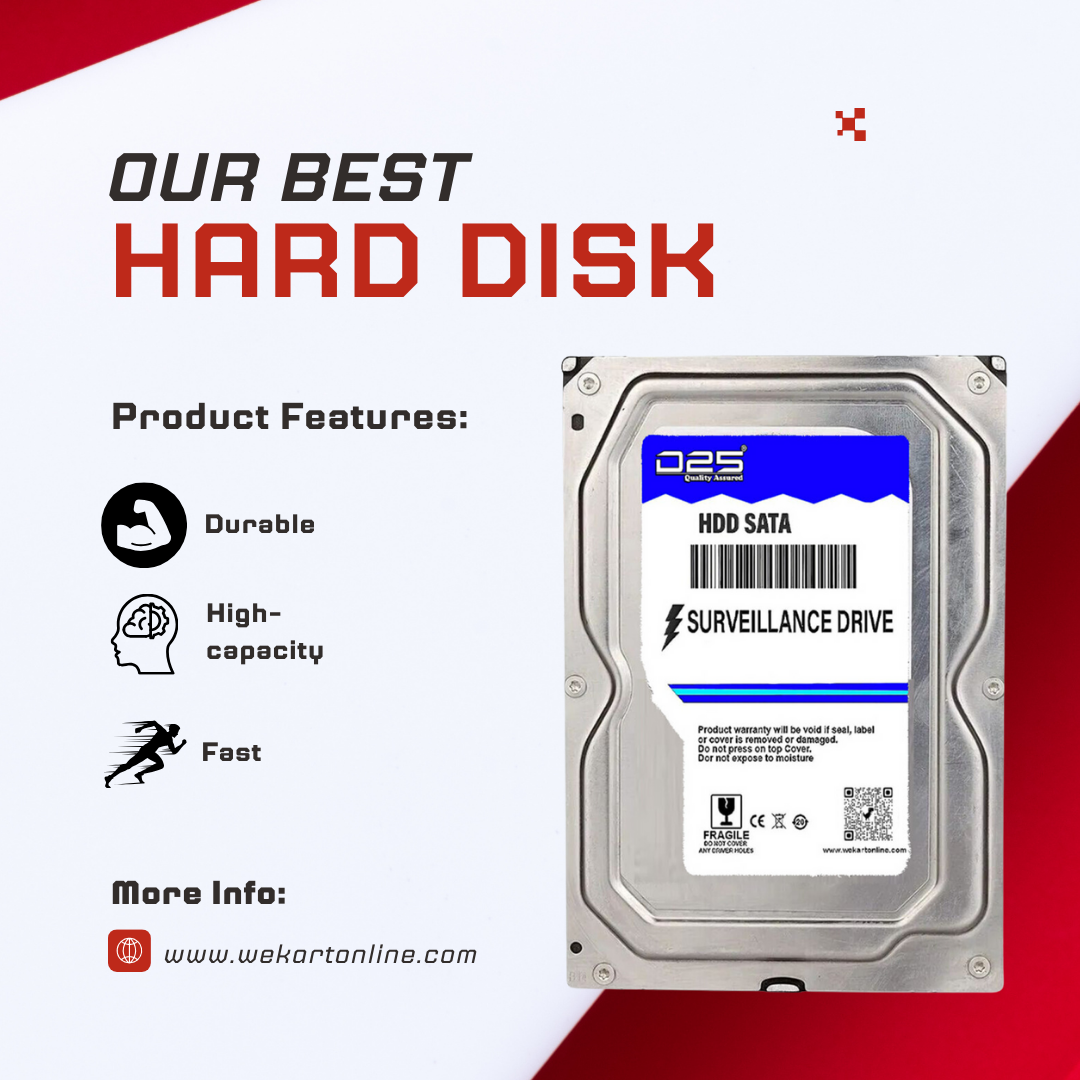



D25 500GB CCTV Hard Disk for Hikvision DVR/NVR | 24x7 Surveillance HDD | 2 Year Warranty
Buy the D25 500GB CCTV hard disk for your Hikvision DVR/NVR system. Designed for 24×7 continuous recording, this surveillance HDD delivers smooth playback, reliable performance, and long-lasting durability. Backed by a 2-year carry-in replacement warranty — perfect for home security, small shops, and office CCTV setups across India.
500GB Storage Capacity
Store several days of CCTV footage – ideal for small home and shop camera setups with 2-4 cameras.
24×7 Continuous Recording
Engineered for round-the-clock surveillance recording without overheating or performance loss.
Plug & Play Installation
Standard 3.5-inch SATA interface. Connect it to your DVR or NVR and start recording in minutes.
Universal Compatibility
Works with Hikvision, CP Plus, Dahua, TP-Link, UNV, and every major CCTV brand available in India.
Ultra Silent Operation
Runs quietly without vibrations – suitable for bedrooms, reception areas, and small offices.
Energy Efficient
Low power draw keeps electricity costs down during 24×7 continuous operation.
2 Years Warranty
Carry-in replacement warranty ensures complete peace of mind with fast after-sales support.
Imported Chipset Technology
Premium internal components for longer lifespan, better heat management, and consistent performance.
D25 500GB CCTV Hard Disk – The Affordable Surveillance Storage for Hikvision DVR/NVR in India
In a country where security awareness is growing rapidly, every home, shop, and office deserves a CCTV system that actually works when it matters most. And at the very core of every dependable CCTV system is a hard disk that silently records everything — 24 hours a day, 7 days a week, without fail. That is precisely what the D25 500GB CCTV hard disk is built to do. Designed specifically for Hikvision DVR and NVR systems (and compatible with virtually every other CCTV brand), this surveillance-grade HDD delivers reliable, continuous recording at a price point that fits every budget.
If you are setting up a new CCTV system for your home, replacing a failed hard disk in your existing Hikvision DVR, or looking for an affordable yet dependable surveillance HDD for a small shop, the D25 500GB hard disk is engineered to meet your exact needs. It is the smart, budget-friendly choice for Indian buyers who refuse to compromise on security.
Why Your CCTV System Absolutely Needs a Surveillance-Grade Hard Disk
One of the most common and costly mistakes that CCTV users across India make is using a regular desktop hard disk inside their DVR or NVR. It seems logical at first — a hard disk is a hard disk, right? Unfortunately, that thinking costs thousands of Indian households and businesses their critical security footage every single year.
A desktop hard disk is designed for office and personal computing — it handles short bursts of activity, rests between tasks, and is built to operate perhaps 8 to 12 hours per day. When you force it to run continuously inside a DVR, recording multiple camera streams around the clock, it overheats, degrades, and eventually fails. Often, the failure happens at the worst possible time — right when you need that footage the most.
The D25 500GB surveillance hard disk is fundamentally different from a desktop drive. Here is exactly why:
- 24×7 Continuous Operation: The D25 HDD is designed from the ground up to run non-stop, day and night, without overheating or slowing down. Its internal components, firmware, and thermal design are all optimized for continuous write operations that CCTV systems demand.
- Multi-Stream Recording: Whether you have 1 camera, 2 cameras, or 4 cameras connected to your DVR, the D25 500GB hard disk handles multiple simultaneous video streams without dropping frames or creating playback issues.
- Surveillance-Tuned Firmware: The firmware inside this hard disk is specifically calibrated for the sequential write patterns that CCTV recording generates, unlike desktop drives that are optimized for random read/write operations.
- Vibration Resistance: DVR units often sit in enclosed spaces — inside cabinets, on shelves, or in server rooms. The D25 HDD is built with vibration-tolerant mechanics that maintain reliability even in less-than-ideal installation environments.
- Energy Efficiency: Running a device 24 hours a day means electricity costs add up. The D25 500GB surveillance HDD consumes significantly less power than standard desktop drives, helping you keep operational costs low.
- Silent Running: Nobody wants a buzzing or clicking sound from their security equipment, especially in homes and quiet office environments. The D25 operates virtually silently.
💡 Important Tip for Indian Buyers: If your Hikvision DVR shows "HDD Error," keeps restarting, or fails to play back recorded footage smoothly, you are almost certainly using a desktop-grade hard disk. Replacing it with a surveillance-grade HDD like the D25 500GB will resolve these problems immediately.
100% Compatible with Hikvision DVR and NVR Systems
Hikvision is one of the most widely used CCTV brands in India. From small homes in Lucknow to large commercial complexes in Mumbai, Hikvision cameras and DVRs are trusted by millions. The D25 500GB hard disk has been thoroughly tested and verified for complete compatibility with all Hikvision DVR and NVR models.
Whether you own a Hikvision 4-channel DVR, an 8-channel DVR, a 4-channel NVR, or any other Hikvision recording device, this hard disk plugs right in. Simply open your DVR, connect the SATA cables (which are already pre-installed inside the DVR), close the unit, power on, and format the hard disk through the DVR menu. Your system will start recording within minutes.
But the compatibility does not stop at Hikvision. The D25 500GB CCTV hard disk also works seamlessly with:
- CP Plus — India's most popular CCTV brand for homes and shops
- Dahua — Widely used in commercial and industrial CCTV installations
- TP-Link VIGI — Growing rapidly in the small business surveillance segment
- UNV (Uniview) — Trusted by professional CCTV installers across India
- Samsung — Used in high-end security installations
- Honeywell — Preferred for corporate and enterprise surveillance
- Godrej — Trusted Indian brand for security systems
- D-Link, Bosch, TVT — And virtually every other DVR/NVR that accepts standard 3.5-inch SATA hard disks
This universal compatibility makes the D25 500GB HDD a go-to choice for CCTV installers and technicians across India who work with multiple brands and need one reliable, affordable hard disk that works everywhere.
How Much CCTV Footage Can 500GB Actually Store?
This is the question every buyer asks, and the honest answer is: it depends on your camera setup. The recording duration varies based on the number of cameras, recording resolution, compression codec, and whether you use continuous or motion-based recording. Here is a practical guide:
| Number of Cameras | Resolution | Compression | Approx. Recording Days (500GB) |
|---|---|---|---|
| 1 Camera | 2MP (1080p) | H.265 | 12–18 Days |
| 2 Cameras | 2MP (1080p) | H.265 | 6–10 Days |
| 2 Cameras | 2MP (1080p) | H.264 | 4–7 Days |
| 4 Cameras | 2MP (1080p) | H.265 | 3–5 Days |
| 4 Cameras | 2MP (1080p) | H.264 | 2–4 Days |
| 1 Camera | 5MP | H.265 | 7–12 Days |
| 2 Cameras | 5MP | H.265 | 4–6 Days |
For a typical small home CCTV setup in India with 2 cameras at 1080p using H.265 compression, the D25 500GB hard disk provides approximately 6 to 10 days of continuous footage. If you enable motion-based recording instead of continuous recording, you can extend this duration by 2 to 3 times, as the DVR only records when activity is detected.
For single-camera setups — such as monitoring a main gate, a shop counter, or a baby's room — 500GB gives you nearly two weeks of footage. This is more than sufficient for the vast majority of small-scale surveillance applications.
🎯 Pro Tip: If you need longer recording duration, enable H.265+ compression in your Hikvision DVR settings. This advanced compression reduces file sizes by up to 70% compared to H.264, effectively tripling your storage capacity without losing video quality.
Who Should Buy the D25 500GB CCTV Hard Disk?
The D25 500GB surveillance HDD is designed for specific use cases where a compact, affordable storage solution is the right fit. Let us explore each scenario in detail:
🏠 Home Security – 1 to 4 Camera Setups
Millions of Indian homes now have CCTV cameras installed at their entrance, parking area, or balcony. If you have a 1 to 4 camera setup at your home — whether it is a flat in Noida, an apartment in Bangalore, or an independent house in Coimbatore — the D25 500GB HDD is an affordable and practical storage solution. It stores several days of footage, and with motion detection enabled, you can easily get over a week of recordings.
For many home users, 500GB is the sweet spot — it is large enough to catch any incidents that need review within a few days, and affordable enough to fit every household budget. Not everyone needs 2TB or 4TB of storage, especially for small home setups.
🏪 Small Shops & Retail Stores
Kirana stores, medical shops, mobile accessory shops, bakeries, salons, and small retail outlets across India are increasingly installing CCTV cameras for theft prevention, staff monitoring, and customer safety. These shops typically use 2 to 4 cameras covering the counter, entrance, and storage area.
The D25 500GB hard disk provides enough storage for 3 to 7 days of footage in these setups — sufficient for most shop owners who review footage daily or within a couple of days of any incident. It is the most cost-effective surveillance storage option for small business owners across India's tier-2 and tier-3 cities.
🏢 Small Offices & Clinics
Doctor's clinics, CA offices, small startups, tuition centres, and similar establishments often have a basic CCTV setup with 2 to 4 cameras. These businesses need reliable recording without investing heavily in storage infrastructure. The D25 500GB HDD fits perfectly — it provides dependable 24×7 recording at an accessible price point.
🔧 CCTV Installers & Technicians
Professional CCTV installers across India frequently need affordable, reliable hard disks for budget-conscious clients. The D25 500GB is the perfect choice for entry-level installations where the client needs basic surveillance capability without a large upfront investment. It also works great as a replacement drive for DVRs with failed hard disks.
👶 Baby Monitoring & Elder Care
An increasingly common use case in India is using a single IP camera or DVR-connected camera to monitor a baby's room or keep an eye on elderly family members. For these single-camera setups, 500GB provides nearly two weeks of recording — more than enough for peace of mind.
D25 500GB vs. Desktop Hard Disk: Why You Should Never Use a Regular HDD in Your DVR
This comparison is critical for Indian buyers who are tempted to save money by using an old desktop hard disk in their Hikvision DVR. Here is a head-to-head breakdown:
| Feature | D25 500GB Surveillance HDD | Desktop 500GB HDD |
|---|---|---|
| Purpose | 24×7 CCTV Recording | Daily computing (8-12 hrs) |
| Continuous Operation | ✅ Yes – built for it | ❌ Not recommended |
| Multi-Camera Support | ✅ Up to 4+ streams | ❌ Struggles with multiple streams |
| Heat Management | ✅ Optimized for low temp | ❌ Overheats under 24×7 load |
| Noise Level | ✅ Ultra silent | ⚠️ Can be noisy |
| Power Draw | ✅ Very low | ⚠️ Higher consumption |
| DVR Detection | ✅ Always detected properly | ⚠️ May show HDD errors |
| Expected DVR Lifespan | 3–5+ years | 4–12 months |
| Vibration Tolerance | ✅ Surveillance-grade | ❌ Consumer-grade |
| Data Corruption Risk | ✅ Very low | ❌ High under continuous write |
| Firmware | ✅ Surveillance-optimized | ❌ Desktop-optimized |
The conclusion is clear: a desktop hard disk will fail prematurely in a DVR. It is not a matter of if — it is a matter of when. The D25 500GB surveillance HDD is built specifically for the demands of CCTV recording and will outlast any desktop drive used in the same application by 3 to 5 times.
Understanding Surveillance HDD Technology Inside the D25 500GB
SATA III Interface
The D25 500GB HDD uses a standard SATA III (6Gb/s) connection, which is universally supported by every DVR and NVR available in India. Whether your Hikvision DVR is brand new or a few years old, the SATA interface guarantees plug-and-play compatibility.
Surveillance-Tuned RPM
Unlike desktop hard disks that spin at 7200 RPM (producing more heat, noise, and wear), the D25 HDD operates at an RPM specifically calibrated for video surveillance. This balance provides enough speed for smooth multi-camera recording while keeping temperatures stable and operational noise minimal — particularly important during India's scorching summer months.
Intelligent Cache Management
The hard disk features optimized cache memory that efficiently handles the constant incoming stream of video data. This prevents bottlenecks even when multiple camera channels are recording simultaneously, ensuring smooth, complete recordings with no gaps or dropped frames.
Thermal Management System
The D25 500GB is designed with thermal management in mind. In India, where ambient temperatures frequently exceed 40°C in summer, hard disks inside DVRs can face extreme heat stress. The D25's internal design dissipates heat efficiently, maintaining stable operating temperatures even in challenging environments.
Common CCTV Problems the D25 500GB Hard Disk Solves
Based on thousands of customer interactions at WeKart Online Store, here are the most frequent issues that Indian CCTV users face — and how the D25 500GB resolves each one:
Problem 1: DVR Displays "No HDD" or "HDD Error"
This typically happens when an incompatible or dying desktop hard disk is installed. The D25 500GB surveillance HDD is designed for seamless DVR integration. Once installed and formatted, your DVR will consistently show "Normal" HDD status — no errors, no detection issues.
Problem 2: CCTV Recordings Are Corrupted or Missing
Corrupted footage renders your entire security system useless. When a desktop HDD cannot keep up with continuous write operations, it drops data, leading to gaps or corrupted files. The D25's surveillance-optimized firmware ensures clean, complete recordings every single time.
Problem 3: Hard Disk Fails Within Months of Installation
This is the most frustrating experience — buying a hard disk, installing it, and having it die within 6 to 12 months. Desktop HDDs running 24×7 in a DVR almost always fail prematurely. The D25 500GB is rated for continuous surveillance operation and comes with a 2-year warranty to back that claim.
Problem 4: Playback is Jerky and Laggy
When you need to review footage — perhaps after a theft, a delivery dispute, or a safety incident — laggy playback is incredibly frustrating. The D25 HDD provides smooth playback because its firmware is designed for the sequential read patterns that DVR playback requires.
Problem 5: DVR Makes Unusual Clicking or Grinding Sounds
Strange noises from your DVR cabinet usually indicate a hard disk that is either failing or inappropriate for surveillance use. The D25 500GB runs completely silently, making it suitable for any environment — living rooms, bedrooms, clinic reception areas, or shop counters.
Problem 6: Excessive Electricity Consumption
Desktop hard disks consume more power because they are not optimized for continuous operation. Over months and years of 24×7 running, this adds up on your electricity bill. The D25's energy-efficient design keeps power costs minimal.
🔧 Installer Tip: When a customer complains about DVR issues, always check the hard disk first. In over 70% of cases, the root cause is a desktop-grade HDD that cannot handle surveillance workloads. Replacing it with the D25 500GB resolves the issue instantly.
Why 500GB Is the Right Choice for Budget-Conscious Indian Buyers
India is a diverse market, and not every CCTV user needs terabytes of storage. Here is why the 500GB capacity makes perfect sense for millions of Indian buyers:
1. Affordable Entry Point
The D25 500GB is the most wallet-friendly surveillance hard disk available. For first-time CCTV users, small shop owners, or anyone on a tight budget, it provides genuine surveillance-grade performance at the lowest possible cost. Security should not be a luxury — and with this hard disk, it is not.
2. Perfect for Small Setups
Not everyone has 8 or 16 cameras. The vast majority of home and small business CCTV installations in India use just 2 to 4 cameras. For these setups, 500GB provides adequate recording time, especially with modern H.265 compression.
3. Ideal for Replacement
If the hard disk inside your Hikvision DVR has failed and you need a quick, affordable replacement to get your cameras recording again, the D25 500GB is the fastest and most economical solution.
4. Motion Detection Multiplies Storage
Most modern DVRs support motion-triggered recording. When enabled, the DVR only records when movement is detected, dramatically reducing storage consumption. With motion detection on a 500GB drive, you can easily get 2 to 3 weeks of footage from a 4-camera setup.
5. Upgrade Path Available
Start with 500GB now, and if your needs grow, you can always upgrade to a 1TB, 2TB, or 4TB hard disk later. WeKart Online Store offers all these capacities in the D25 range, ensuring a smooth upgrade path.
Installation Is Incredibly Simple — Even for Beginners
You do not need to be a CCTV professional to install the D25 500GB hard disk in your Hikvision DVR. The entire process takes less than 10 minutes and requires only a Phillips head screwdriver. Here is how:
Power Off Your DVR Completely
Turn off the DVR and unplug the power adapter from the back. Wait about 30 seconds for all internal components to fully power down. Safety first — never work on electronics while they are powered on.
Open the DVR Casing
Unscrew the top or side panel of your Hikvision DVR using a Phillips screwdriver. Most models have 4 to 6 screws. Carefully lift the cover to reveal the internals.
Mount the Hard Disk
Place the D25 500GB hard disk on the mounting bracket at the bottom of the DVR. Align the screw holes and secure using the provided screws. Ensure it sits firmly without wobbling.
Connect SATA Data Cable
Plug the SATA data cable (already inside the DVR) into the hard disk's SATA port. The L-shaped connector only fits one way, so there is zero risk of wrong connection.
Connect SATA Power Cable
Attach the SATA power cable from the DVR's internal power supply to the hard disk's power port. This provides the electricity the drive needs to operate.
Reassemble and Power On
Close the DVR cover, tighten all screws, reconnect the power adapter, and switch on the DVR. The system will automatically detect the new hard disk.
Format the HDD Through DVR Menu
Navigate to Main Menu → HDD Management → Select the new HDD → Click Format → Confirm. Formatting takes 1 to 2 minutes. Once done, the status will show "Normal" and recording begins automatically.
That is it. Seven simple steps, no technical expertise required. Your Hikvision DVR will now record smoothly on the D25 500GB surveillance hard disk.
Optimizing Your DVR Settings for Maximum Storage Duration
With 500GB of storage, every bit of optimization helps. Here are expert tips to maximize your recording duration:
Enable H.265 or H.265+ Compression
If your Hikvision DVR supports H.265 (or the even more efficient H.265+), enable it immediately. H.265 reduces file sizes by about 50% compared to H.264, and H.265+ can reduce them by up to 70%. This means your 500GB hard disk effectively behaves like 1TB or more in terms of recording duration.
Use Motion Detection Recording
Instead of recording 24×7 continuously, set your DVR to record only when motion is detected. For areas with moderate activity (like a shop entrance or home gate), this can reduce storage usage by 50 to 80%, dramatically extending your recording duration.
Adjust Resolution Where Possible
Not every camera needs to record at the highest resolution. For cameras covering wide areas where fine detail is not critical, dropping from 1080p to 720p halves the storage requirement while still providing usable footage.
Enable Auto-Overwrite
Set your DVR to automatically overwrite the oldest footage when the hard disk is full. This ensures continuous recording without manual intervention. Most Hikvision DVRs have this option under HDD settings as "Overwrite" or "Recycle."
Why Buy from WeKart Online Store?
When you buy the D25 500GB CCTV hard disk from WeKart Online Store, you are not just buying a product — you are getting a complete buying experience built around trust, reliability, and customer satisfaction. Here is why thousands of Indian buyers choose us:
- 100% Genuine Products: Every hard disk we sell is brand new and authentic. We source directly from authorized channels. No refurbished or counterfeit products, ever — guaranteed.
- GST Invoice Provided: We issue proper GST-compliant invoices with every order. This is essential for business buyers, CCTV installers, and shop owners who need invoices for tax credit claims and accounting purposes.
- Fast Pan-India Shipping: We ship to every serviceable pin code in India through reliable courier partners like Delhivery, Blue Dart, and DTDC. Most orders are dispatched within 24 hours and delivered within 3 to 7 business days.
- Secure Double-Box Packaging: Hard disks are delicate. We use double-box packaging with thermocol and bubble wrap to ensure your D25 500GB HDD arrives in perfect condition, no matter where in India you are located.
- Genuine 2-Year Warranty: Our carry-in replacement warranty is honoured without excuses. If your hard disk fails within the warranty period, contact us, ship it back, and we will send a replacement promptly.
- Expert Support: Our team includes experienced CCTV professionals who can guide you on choosing the right hard disk, troubleshooting installation issues, and optimizing your DVR settings. We are not just a store — we are your CCTV storage partners.
- Honest Pricing: No inflated MRPs, no fake discounts. Just straightforward, competitive pricing for quality surveillance products.
The Booming CCTV Market in India — Why Storage Matters More Than Ever
India's video surveillance market is expanding at an astonishing rate, projected to grow over 20% annually. Government initiatives like the Safe City Project, Smart City Mission, and state-level mandates for CCTV in commercial establishments are driving mass adoption. From metropolitan cities to small towns and even rural areas, security cameras are becoming standard infrastructure.
But a camera is only as good as its recording system. Without reliable storage, your cameras are nothing more than expensive decorations. The footage they capture needs to be stored safely, be available for review, and remain intact for days or weeks. A failed hard disk means you lose everything — evidence, accountability, and peace of mind.
That is why choosing a surveillance-grade hard disk — even a compact 500GB model like the D25 — is one of the most important decisions in any CCTV installation. It is the silent guardian that ensures every second of footage is preserved.
Maintenance Tips to Extend Your D25 500GB Hard Disk's Life
The D25 500GB is built for durability, but following these best practices will help you maximize its lifespan — especially important in Indian conditions:
- Ensure Proper DVR Ventilation: Place your DVR in a well-ventilated location with at least 10cm of clearance on all sides. Avoid enclosed cabinets without airflow. In India's summer heat, ventilation is critical for HDD longevity.
- Use a UPS / Power Backup: Power fluctuations and sudden outages are common across India. Every unexpected power cut risks damaging the hard disk's internal components. A small 600VA UPS (costing around ₹2,000 to ₹3,000) protects your DVR and HDD from voltage spikes and sudden shutdowns.
- Avoid Moving the DVR While Running: Hard disks have delicate moving parts. Never bump, move, or shift your DVR while it is powered on. If you need to relocate the unit, power off completely and wait 30 seconds before moving.
- Clean Dust Regularly: Indian environments tend to be dusty. Clean the outside of your DVR and check that ventilation holes are not blocked by dust. Use a dry cloth or compressed air every 2 to 3 months.
- Monitor HDD Health: Your Hikvision DVR shows HDD health status in the settings menu. Check this periodically. If you see S.M.A.R.T. warnings or error counts increasing, it is time to consider replacement before complete failure.
- Keep DVR Firmware Updated: Hikvision and other DVR manufacturers release firmware updates that often include improved HDD management algorithms. Keep your DVR firmware current for optimal performance.
Understanding the 2-Year Carry-In Replacement Warranty
The D25 500GB CCTV hard disk comes with a comprehensive 2 Years Carry-In Replacement Warranty. Here is everything you need to know:
- What is Covered: Manufacturing defects, premature mechanical failure, and operational issues that occur during normal surveillance use.
- What is Not Covered: Physical damage from drops or impacts, water or liquid damage, damage from power surges (this is why we recommend a UPS), and use in non-surveillance applications.
- How to Claim: Contact WeKart Online Store through our website or customer support channels. We will provide a return shipping address. Ship the defective hard disk to us (customer bears shipping cost for carry-in warranty). We will test the drive and dispatch a replacement within 5 to 7 business days.
- Warranty Proof: Your WeKart Online Store order confirmation email or Shopify order receipt serves as your warranty document. Keep it safe.
We believe in hassle-free warranty service. If your hard disk fails within the warranty period, we will replace it — simple as that.
Choosing the Right Hard Disk Capacity for Your Needs
Still wondering if 500GB is right for you? Here is a quick capacity guide to help you decide:
| Your Setup | Recommended Capacity | Best For |
|---|---|---|
| 1–2 Cameras (Home) | 500GB ✅ (This Product) | Budget-friendly, basic surveillance |
| 2–4 Cameras (Home/Shop) | 500GB or 1TB | Small setups with a few days' storage |
| 4–8 Cameras (Shop/Office) | 1TB or 2TB | Extended recording periods |
| 8–16 Cameras (Large Office) | 2TB or 4TB | Weeks of multi-camera footage |
| 16+ Cameras (Industrial) | 4TB or multiple drives | Maximum storage capacity |
If you have a 1 to 4 camera setup, the D25 500GB is an excellent, cost-effective choice. If you anticipate needing more storage in the future, consider starting with our 1TB or 2TB options instead. WeKart Online Store offers the complete D25 range so you can choose the perfect capacity for your needs.
Indian Buying Behavior: Why Smart Buyers Choose Surveillance HDDs
Indian consumers are becoming increasingly informed about technology purchases. The days of accepting "any hard disk will do" advice from local technicians are fading. Here is what smart Indian buyers look for when purchasing a CCTV hard disk:
- Warranty First: Indian buyers prioritize warranty above almost everything else. The D25 500GB's 2-year warranty provides the assurance that Indian customers demand.
- Value for Money: Price sensitivity is high in India, but it is coupled with quality awareness. Buyers want the best possible product within their budget — and the D25 500GB delivers exactly that.
- Brand Compatibility: Indian buyers want explicit confirmation that a hard disk works with their specific DVR brand — especially Hikvision and CP Plus. The D25 500GB is verified compatible with both.
- GST Invoice: For business buyers, a proper GST invoice is non-negotiable. WeKart provides this with every order.
- Trust in Seller: With so many unreliable sellers online, Indian buyers look for stores with genuine products, clear warranty policies, and responsive customer support. WeKart Online Store delivers on all three.
The D25 500GB CCTV hard disk represents the ideal combination of affordability, reliability, and performance for Indian buyers who need dependable surveillance storage without breaking the bank. Whether you are a homeowner setting up your first CCTV system, a shop owner upgrading your security, or a technician installing systems for clients, this hard disk delivers exactly what your Hikvision DVR needs.
🏆 Affordable Hikvision 500GB hard disk with reliable CCTV recording performance for small setups — available now at WeKart Online Store with fast shipping across India.
Full Brand Compatibility List
The D25 500GB CCTV hard disk works with all major DVR and NVR brands sold in India:
| Brand | Device Type | Status |
|---|---|---|
| Hikvision | DVR / NVR (All Models) | ✅ Fully Compatible |
| CP Plus | DVR / NVR (All Models) | ✅ Fully Compatible |
| Dahua | DVR / NVR / XVR | ✅ Fully Compatible |
| TP-Link VIGI | NVR | ✅ Fully Compatible |
| UNV (Uniview) | NVR / XVR | ✅ Fully Compatible |
| Samsung | DVR / NVR | ✅ Fully Compatible |
| Honeywell | DVR / NVR | ✅ Fully Compatible |
| Godrej | DVR / NVR | ✅ Fully Compatible |
| TVT | DVR / NVR | ✅ Fully Compatible |
| Bosch | DVR / NVR | ✅ Fully Compatible |
| D-Link | NVR | ✅ Fully Compatible |
| Prama (CP Plus) | DVR / NVR | ✅ Fully Compatible |
🛡️ 2 Years Carry-In Replacement Warranty
Every D25 500GB hard disk is backed by a genuine 2-year warranty. If you encounter any issues, simply ship it to us for a hassle-free replacement. Quality assurance you can count on — only from WeKart Online Store.
📋 Features & Specifications
Technical Specifications
| Brand | D25 |
| Model | D25 500GB Surveillance HDD |
| Storage Capacity | 500GB |
| Form Factor | 3.5 inch |
| Interface | SATA III (6Gb/s) |
| Drive Type | Surveillance-Grade HDD |
| Designed For | 24×7 CCTV DVR/NVR Recording |
| Camera Support | Up to 4+ cameras |
| Noise Level | Ultra Silent |
| Power Consumption | Low (Energy Efficient) |
| Operating Temperature | 0°C to 65°C |
| Vibration Tolerance | High (Surveillance Optimized) |
| Warranty | 2 Years Carry-In Replacement |
Key Features Summary
- Surveillance-grade hard disk built for CCTV DVR and NVR systems
- Supports 24×7 uninterrupted continuous recording
- Compatible with Hikvision, CP Plus, Dahua, TP-Link, UNV, and all major brands
- 500GB storage for budget-friendly surveillance setups
- Standard 3.5-inch SATA III interface for universal compatibility
- Multi-camera simultaneous recording without frame drops
- Ultra-silent operation — suitable for homes and bedrooms
- Low power consumption for energy-efficient 24×7 operation
- Imported chipset technology for enhanced durability
- Plug and play — no technical expertise needed
📦 Item Details
What's in the Box
- 1× D25 500GB Surveillance Hard Disk (3.5-inch SATA)
- Warranty documentation
Note: SATA data cable and power cable come pre-installed inside your DVR/NVR. The hard disk connects using cables already present in the DVR unit.
Physical Dimensions
| Length | 147 mm |
| Width | 101.6 mm |
| Height | 26.1 mm |
| Weight | Approximately 400–550g |
Important Notes
- This is a surveillance-grade internal hard disk for DVR and NVR use
- Must be formatted through DVR menu before first use (standard procedure)
- Verify your DVR has an available HDD bay before purchasing
- For best performance and longevity, use with a UPS or voltage stabilizer
- Product images are for illustration — actual appearance may vary slightly
ℹ️ Additional Details
Shipping Information
- Dispatch: Within 24 hours of order confirmation (business days)
- Delivery: 3–7 business days depending on location
- Courier Partners: Delhivery, Blue Dart, DTDC, or equivalent
- Packaging: Double-boxed with foam/bubble wrap for transit protection
- Coverage: Pan-India delivery to all serviceable pin codes
Warranty Policy
- Type: Carry-In Replacement Warranty
- Period: 2 Years from date of purchase
- Process: Contact WeKart → Ship defective unit to us → Receive replacement
- Proof: Order confirmation email or Shopify order receipt
- Exclusions: Physical damage, water damage, power surge damage, misuse
Payment Options
- Credit Card / Debit Card (Visa, Mastercard, RuPay)
- UPI (Google Pay, PhonePe, Paytm, BHIM)
- Net Banking (All major banks)
- EMI (On eligible cards)
- Cash on Delivery (COD) — where available
GST Invoice
GST-compliant invoices are provided with all orders. Business buyers can use these for input tax credit. If you need the invoice under a specific business name or GSTIN, mention the details in order notes or contact us after ordering.
🔧 How to Install / Use
Complete Installation Guide for Hikvision DVR
Installing the D25 500GB hard disk in your Hikvision DVR (or any other brand) is simple. No professional help needed — just follow these steps:
- Turn Off & Unplug the DVR: Disconnect the power adapter completely. Wait 30 seconds for residual power to discharge. Never open a DVR that is still powered on.
- Remove the DVR Cover: Use a Phillips screwdriver to remove 4–6 screws from the top or side panel. Carefully lift the cover off.
- Identify the HDD Mounting Area: You will see a flat mounting bracket at the bottom of the DVR, along with SATA data and power cables already connected to the motherboard.
- Place the D25 500GB Hard Disk: Set the hard disk on the bracket with the label facing up. Align screw holes on the HDD with the bracket holes.
- Secure with Mounting Screws: Tighten the hard disk to the bracket using the screws provided with your DVR. Firm but not over-tight.
- Connect the SATA Data Cable: Plug the SATA data cable into the hard disk's SATA port. The L-shaped connector ensures correct orientation.
- Connect the SATA Power Cable: Attach the power cable from the DVR's internal power supply to the hard disk.
- Close the DVR and Power On: Replace the cover, tighten screws, reconnect power, and turn on the DVR.
- Format Through DVR Settings: Go to Main Menu → HDD Management → Select new HDD → Format → Confirm. Takes 1–2 minutes.
- Verify and Start Recording: After formatting, HDD status shows "Normal." Recording begins automatically from all connected cameras.
Quick Tips for First-Time Installers
- Handle the hard disk gently — never drop or bump it
- Work on a clean, dry, dust-free surface
- If unsure about any step, consult your DVR's user manual or contact WeKart support
- After installation, verify the HDD shows correct 500GB capacity in DVR settings
- Configure your preferred recording mode (continuous, motion, or scheduled)
📖 Usage Guide (Step-by-Step)
Maximizing Your 500GB Storage — DVR Configuration Tips
Step 1: Choose the Right Compression
If your Hikvision DVR supports H.265 or H.265+, enable it in recording settings. H.265 uses approximately 50% less storage than H.264, effectively doubling your recording capacity. H.265+ can save up to 70%.
Step 2: Configure Recording Mode
- Continuous Recording: Records 24×7 nonstop. Best for high-security areas like main gates, cash counters, and parking lots.
- Motion Detection Recording: Records only when movement is detected. Saves massive storage and simplifies footage review. Best for corridors, storerooms, and low-traffic areas.
- Scheduled Recording: Records only during specific hours (e.g., shop hours). Ideal for businesses that only need coverage during operating times.
Step 3: Set Resolution Wisely
For 500GB storage, consider using 1080p for critical cameras (entrance, counter) and 720p for secondary cameras (corridor, storage room). This balances quality with storage duration.
Step 4: Enable Auto-Overwrite
Set your DVR to automatically overwrite the oldest recordings when the hard disk fills up. Go to HDD settings → Enable "Overwrite" or "Recycle." This ensures uninterrupted recording.
Step 5: Set Up Playback Access
- Right-click on live view and select "Playback"
- Choose the camera channel and date to review
- Use the timeline to navigate to the specific time
- Use play/pause/fast-forward/rewind controls
- Use "Backup" to save important clips to a USB drive
Step 6: Remote Viewing Setup
Download Hik-Connect app on your phone. Configure P2P/cloud access on your DVR. This lets you view live camera feeds and review recordings stored on the D25 500GB HDD from anywhere — your office, while travelling, or from another city.
Step 7: Regular Health Checks
Check HDD status monthly through DVR menu: Main Menu → HDD → Status. Verify it shows "Normal" with correct capacity. If you see error warnings, back up important footage and contact WeKart for warranty support.
⚠️ Safety Tips (Avoid Common Mistakes)
Top Mistakes That Destroy CCTV Hard Disks — And How to Avoid Them
❌ Mistake 1: No UPS or Power Backup
Power cuts happen frequently across India — especially during monsoon and in semi-urban areas. Every sudden shutdown risks corrupting data and damaging disk sectors over time.
✅ Fix: Invest in a 600VA UPS (₹2,000–₹3,000). It protects both your DVR and hard disk from voltage spikes and sudden power cuts. This single investment can double your HDD's lifespan.
❌ Mistake 2: DVR Placed in Enclosed Cabinet
Many people hide their DVR inside a sealed wooden cabinet or behind thick curtains with zero airflow. The hard disk overheats, especially in Indian summers when room temperatures can exceed 35–40°C.
✅ Fix: Keep at least 10cm clearance around the DVR on all sides. If a cabinet is necessary, add ventilation holes or a small USB-powered fan to maintain airflow.
❌ Mistake 3: Using a Desktop Hard Disk
The number one killer of DVR storage. Desktop HDDs fail within months when subjected to 24×7 continuous recording — they simply are not designed for it.
✅ Fix: Always use a surveillance-grade HDD like the D25 500GB. It is built from the ground up for the exact workload that CCTV systems generate.
❌ Mistake 4: Skipping the Format Step
Some users connect the HDD and expect instant recording. While the DVR will detect the drive, it must be formatted through the DVR menu before it can record.
✅ Fix: After physical installation, go to HDD Management in DVR settings and format the drive. Takes just 1–2 minutes.
❌ Mistake 5: Moving the DVR While It Is Running
Hard disks contain spinning platters and delicate read/write heads. Any sudden movement or bump while the DVR is running can cause catastrophic mechanical damage.
✅ Fix: Once your DVR is installed and running, leave it in place. If you must move it, power off completely and wait 30 seconds before touching it.
❌ Mistake 6: Ignoring DVR Error Messages
When your DVR shows "HDD Error," "Bad Sectors," or "Abnormal" status, it is warning you that the hard disk is failing. Do not ignore these signs.
✅ Fix: Immediately back up any critical footage to USB. Then contact WeKart Online Store for warranty replacement if the drive is within the 2-year warranty period.
General Safety Checklist
- ☑️ Keep DVR away from water, moisture, and direct sunlight
- ☑️ Do not place heavy objects on top of the DVR
- ☑️ Ensure stable power supply with surge protection
- ☑️ Check HDD temperature through DVR settings (keep below 55°C)
- ☑️ Clean dust from DVR vents every 2–3 months
- ☑️ Never force cables into connectors — they only fit one way
🛒 Buying Guide (Who Should Buy This?)
Is the D25 500GB CCTV Hard Disk the Right Choice for You?
✅ You Should Buy This If:
- You have a 1 to 4 camera CCTV setup at home, shop, or small office
- You need an affordable surveillance HDD without compromising on quality
- Your DVR is Hikvision, CP Plus, Dahua, TP-Link, UNV, or any standard brand
- You are replacing a failed hard disk and need a quick, budget-friendly solution
- You use motion detection recording (extends storage significantly)
- You are a CCTV installer doing budget installations for clients
- You need a single-camera monitoring solution (baby cam, elder care, gate camera)
- You want genuine warranty and trusted seller support
⚠️ Consider a Larger Capacity If:
- You have 4–8 cameras and need 2+ weeks of footage → Consider our 1TB or 2TB HDD
- You have 8–16 cameras → Consider our 2TB or 4TB HDD
- You record at 4MP or 5MP resolution → Higher resolution uses more storage
- You need continuous 24×7 recording with 4+ cameras for extended periods
Do NOT Buy This If:
- You need storage for a computer or laptop — this is a surveillance-grade 3.5-inch internal drive
- You need a portable/external hard disk — this requires internal DVR installation
- You need NAS or server storage — different product category
Capacity Selection Quick Guide
| Cameras | Best Capacity | Why |
|---|---|---|
| 1–2 | 500GB ✅ (This Product) | Affordable, adequate storage |
| 2–4 | 500GB or 1TB | Good balance of cost and duration |
| 4–8 | 1TB or 2TB | Extended recording periods |
| 8–16 | 2TB or 4TB | Large multi-camera setups |
Budget Comparison: Why 500GB Makes Financial Sense
For small setups, investing in a 2TB or 4TB drive is like buying a 7-seater car for a family of two — overkill and unnecessarily expensive. The D25 500GB gives you exactly the right amount of storage for 1–4 camera setups at the most competitive price point. Save your money and put it towards a UPS or better cameras instead.
❓ Frequently Asked Questions (FAQs)
Q1. Is the D25 500GB hard disk compatible with Hikvision DVR?
Yes, the D25 500GB surveillance hard disk is 100% compatible with all Hikvision DVR and NVR models. It uses a standard 3.5-inch SATA interface that is universally supported.
Q2. Can this hard disk record CCTV footage 24×7?
Absolutely. The D25 500GB is specifically designed for 24×7 continuous surveillance recording. It operates nonstop without overheating, performance loss, or premature failure.
Q3. How many days of recording can 500GB store?
With 2 cameras at 1080p using H.265 compression: 6–10 days. With motion detection enabled, this can extend to 15–20+ days. Single-camera setups get 12–18 days of continuous recording.
Q4. Is 500GB enough for home CCTV?
Yes, for 1 to 4 camera home setups, 500GB is more than adequate — especially with motion detection recording and H.265 compression. It is the most popular choice for budget home security systems.
Q5. What warranty does this hard disk come with?
2 Years Carry-In Replacement Warranty. If the hard disk fails within the warranty period, contact WeKart Online Store for a hassle-free replacement.
Q6. Does it work with CP Plus DVR?
Yes, the D25 500GB is fully compatible with CP Plus DVR and NVR systems, as well as Dahua, TP-Link VIGI, UNV, Samsung, Honeywell, Godrej, and all other standard CCTV brands.
Q7. Can I use a regular desktop hard disk in my DVR instead?
We strongly advise against it. Desktop hard disks are not built for 24×7 operation and typically fail within 4–12 months in a DVR. Surveillance-grade HDDs like the D25 500GB are designed for this specific workload and last 3–5+ years.
Q8. How do I install this hard disk?
It takes less than 10 minutes: Power off DVR → Open casing → Mount HDD → Connect SATA cables → Close casing → Power on → Format via DVR menu. No professional help needed. See our detailed installation guide above.
Q9. Will I get a GST invoice?
Yes, WeKart Online Store provides GST-compliant invoices with every order. Perfect for business buyers and installers who need invoices for tax purposes.
Q10. Is this a new product or refurbished?
All products sold by WeKart Online Store are 100% brand new and genuine. We never sell refurbished, open-box, or used products.
Q11. What if the DVR does not detect the hard disk?
This is rare, but try: (1) Reseat both SATA cables firmly, (2) Try a different SATA port if available, (3) Check the power cable connection, (4) Restart the DVR. If the issue continues, contact WeKart customer support.
Q12. Can I upgrade from 500GB to a larger drive later?
Absolutely. Simply remove the 500GB drive and install a 1TB, 2TB, or 4TB surveillance HDD. WeKart offers the complete D25 range for easy upgrades.
Q13. Is cash on delivery available?
Yes, COD is available for select pin codes across India. UPI, credit/debit cards, net banking, and EMI options are also available at checkout.
Q14. How fast is shipping?
Orders are dispatched within 24 hours (business days). Delivery takes 3–7 business days depending on your location in India.
Q15. How is the D25 500GB different from WD Purple or Seagate SkyHawk?
All three are surveillance-grade hard disks. The D25 500GB offers comparable 24×7 performance at a significantly lower price, making it the best value option for budget-conscious CCTV setups in India.
🔗 Need more storage? Check our 1TB, 2TB & 4TB CCTV Hard Disks for larger setups at WeKart Online Store.
Affordable Hikvision 500GB hard disk with reliable CCTV recording performance for small setups — trusted by thousands of Indian buyers at WeKart Online Store.

Need Large Quantities? Get India's Best Bulk Price — Only at WeKart Online Store
Whether you're an IT distributor, CCTV installer, office procurement manager, or reseller — WeKart offers unbeatable bulk pricing on D25 500GB CCTV Hard Disk for Hikvision DVR/NVR | 24x7 Surveillance HDD | 2 Year Warranty and all D25 with full GST invoice for every business purchase. No middlemen. Direct pricing. Fast pan-India dispatch.